# Move notes across notebooks
Using notebooks help you stay organized and easily refer to your notes of the same topic. Below are some quick ways you can use to reorganize your notes into different notebooks.
### On desktop
You may do so by clicking the **`Notebook`** icon at the bottom left of your note editor and selecting the notebooks you want to add your notes to, or use the shortcut **`Cmd/Ctrl`** + **`Shift`** + **`B`** to open the **`Add to Notebooks`** pop up.
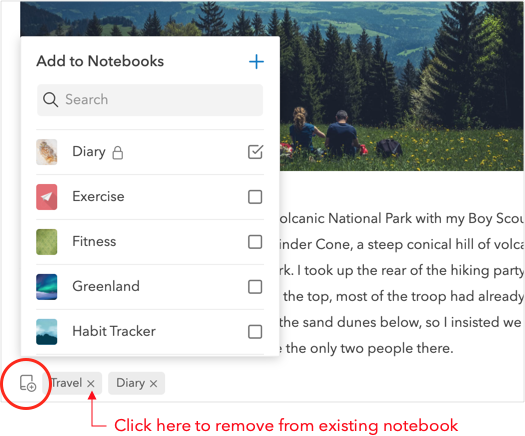
If you want to remove your note from the current notebook, you can untick the current notebook from the list of notebook in the pop up. Alternatively, the quicker way is to simply click on the **`x`** button at the notebook label.
If you want to move multiple notes into another notebook, you may select them simultaneously by holding the **`Shift`** or **`Cmd/Ctrl`** key.

* To move to another notebook, select **`Move to another notebook`** option from the menu on the right panel.
* To add to another notebook, select **`Add to notebooks`**. You will then be able reorganize your notes into different notebooks.
### On mobile
On mobile apps, you can perform the same actions by tapping on the **`Notebooks`** icon at the bottom of the note editor.
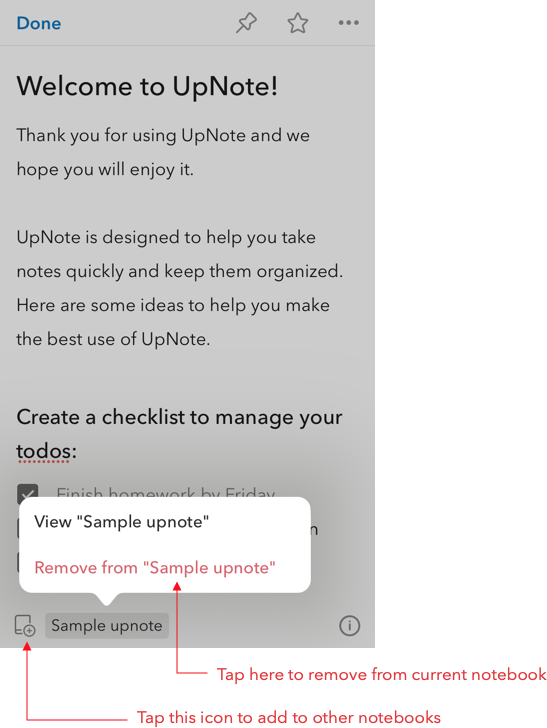
If you want to move multiple notes at the same time, you can do so from the note list screen. Tap the **`...`** button to select multiple notes and tap the **`Notebook`** button to add notes to other notebooks.
